Margin marks
6 human-approved annotations, anchored to the article text.
The first version of this site was built in the fall of 2021.
It started, as many personal sites do, with a theme I downloaded, gutted, rearranged, and slowly bullied into becoming mine. The bones were not especially elegant. Flat HTML pages. Repeated markup. Old template folders. CSS overrides stacked on top of other CSS overrides. A file structure that made sense only if you had personally lived through every questionable decision that produced it.
But I liked it.
More specifically, I liked the way it felt. It had a fixed nav, a tiny monogram, letterspaced headings, quiet white space, and a kind of editorial pacing that suited the work. I also really liked the idea of using animated GIFs everywhere. Not as decoration exactly, but as texture. I wanted the site to move. Video work should not sit there like a pinned butterfly. Motion graphics should not be represented by a dead rectangle. Even web projects, when possible, should have some little signal of life.
So when I finally decided to rebuild the site, the goal was not to burn it down and start over. The goal was stranger and more delicate: Keep the surface familiar and make the internals more humane.
That became the unofficial architecture brief.
The problem(s) with the old site
The old portfolio still looked fine, which in some ways made it more annoying.
If something is obviously broken, you fix it. If something mostly works but is quietly miserable to maintain, it lingers. My site had become that kind of object.
Adding a new page meant copying an old page and carefully editing around brittle markup. Updating a portfolio section meant remembering which pieces of content lived where. Photography galleries were especially painful. Every gallery required exporting images, preparing thumbnails, painstakingly renaming each file, arranging layouts, writing page markup, checking paths, and trying not to break everything .
The site had accumulated history. Active assets lived near backup assets. Current work lived near old theme files. Some pages were real. Some were ghosts. Some were probably load-bearing ghosts.
I wanted to keep the same visual atmosphere, but move the site out of hand-edited pages and into something structured, reusable, and easier to extend.
The rebuild strategy
I briefly considered whether this should become a full modern web app. That would have been the fashionable move. Pick a framework, wire up a database, add a CMS, create a login, build an admin surface, deploy the whole glowing machine somewhere.
But the more I thought about it, the less sense that made.
This is a personal portfolio. It needs to be fast, stable, easy to host, and easy to back up. It does not need a live database. It does not need authentication on the public site. It does not need a giant dependency stack just to render a project page.
So the new version is a static-first and content-driven. The basic shape is:
structured content -> shared templates -> static HTML -> Firebase Hosting
The content lives in JSON files. The templates live in a shared template directory. A plain Node build script generates the finished site into a dist folder. Firebase serves the static output.
That means the public site is still simple: HTML, CSS, JavaScript, images, videos, and other assets. But the working site is no longer a pile of hand-coded pages. It has a content model.
The new structure includes:
  src/content/site.json
  src/content/pages.json
  src/content/projects.json
  src/content/photoSets.json
  src/content/fieldNotes.json
  src/content/webArchive.json
That one change did a lot of work. Global navigation, footer links, page copy, project data, photo galleries, archived web concepts, and blog-style posts all moved out of scattered markup and into structured files.
The old site was hand-built. The new site is generated.
That may sound less romantic, but it is much easier to live with.
Preserving the old voice
The important thing was not just making the code cleaner. It was making sure the site still sounded like itself.
A lot of rebuilds fail because they confuse modernization with amnesia. They make the internals better and surface worse. The strange little choices disappear. The rough personal texture gets replaced with a template-flavored smoothness.
I did not want that.
So the rebuild preserved a lot of the original language of the original site: the fixed navigation, the small JM monogram, the letterspaced headings, the gray-white atmosphere punctuated with bursts of color and motion, the quiet footer rhythm, the project-card typography, and especially the animated GIF thumbnails. The GIFs survived because they were part of the point (load times be damned). They made the portfolio feel less like a filing cabinet and more like a wall of moving studies: fragments, sketches, scenes, and signals arranged into something alive.
The rebuild also preserved the old web experiments instead of pretending they never happened. Some archive web concepts now live as preserved demos, which feels right. Personal site should have sediment. They should show the trail a little.
This was not a rebrand. It was closer to removing the drywall, replacing the wiring and trying very hard not to spill the furniture.
AI as code archaeologist
Codex was the implementation partner on this project, and this was the first time AI felt genuinely useful to me for a personal codebase rebuild.
Not because it produced a finished site in one magical blast. That is not what happened. The useful pattern was iterative:
inspect -> change -> review -> compare -> adjust -> repeat
Codex was good at reading the whole hideous project structure, tracing what mattered, pulling repeated markup into reusable rendering patterns, writing build scripts, debugging Firebase behavior, generating admin tools, and doing the tedious migration work that usually drains all momentum from a project like this.
It was especially useful as a kind of tireless code archaeologist.
Old portfolio sites are not just code. They are memory structures. There are abandoned folders, old naming conventions, temporary fixes that became permanent, and visual details that matter even when they are technically very silly. AI was useful because it could keep crawling through those swamp-filled layers of old markup, backup folders, theme debris, and CSS overrides without getting bored or offended.
A local cms without a public cms
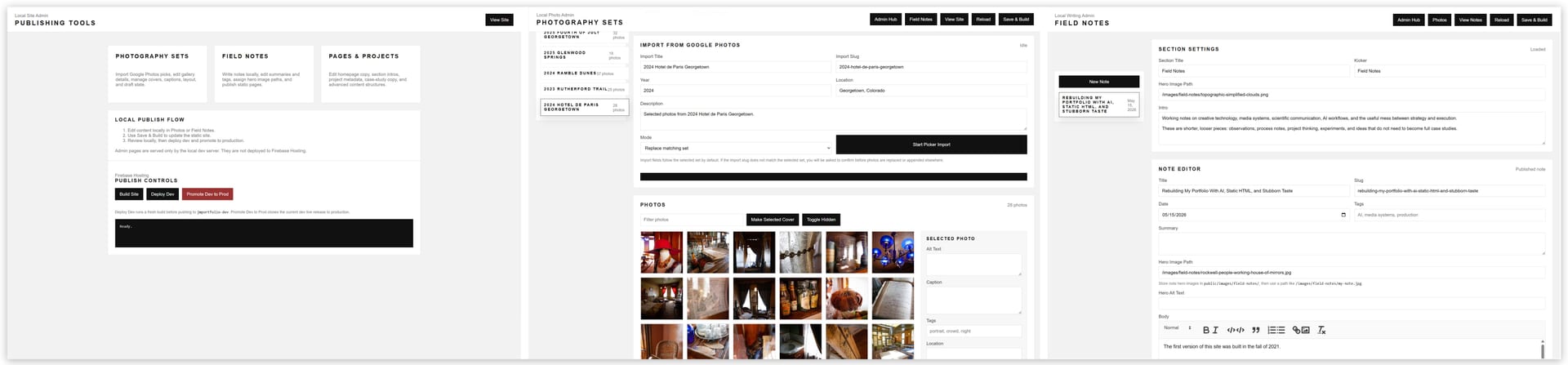
One of the more interesting architectural decisions was building local admin tools instead of using a traditional CMS.
There is currently a small local admin hub at: /admin
From there, I can manage photo galleries and Field Notes posts during development. These admin pages are served by the local dev server, but they are not emitted into the static Firebase deploy output.
That split is important.
The public site remains static. There is no exposed admin backend, no public login, no production database, and no live CMS dependency. But locally, the project has CMS-like controls where they are useful.
The photo admin is probably the clearest example.
Photography was one of the biggest pain points in the old site. The new workflow uses the Google Photos Picker API as an import surface. I can select images from Google Photos, download stable local copies into the project, write gallery metadata into photoSets.json , and rebuild the static site.
The key choice was not to embed Google Photos directly at runtime.
Google Photos is great as a familiar curation interface. It is much less appealing as a public website dependency. I do not want a portfolio gallery relying on fragile external image URLs or embed behavior that may change later. So Google Photos becomes the source, not the host.
Field Notes (what you're reading now) works the same way. The local writing admin saves posts into fieldNotes.json , supports drafts, tags, summaries, dates, hero images, and body text, then the build script generates public pages and an RSS feed.
No giant publishing platform. No database. No ceremony.
Just a small local machine for turning notes into pages.
Static does not mean rigid
There is a persistent idea that static sites are simple in a limiting way. That can be true, but it does not have to be.
This rebuild reminded me that static can still mean flexible. The trick is to move the complexity to the right side of the publishing process.
The public site should be boring. Boring is good. Boring loads quickly. Boring survives. Boring does not wake up at 2 a.m. because an authentication provider changed a callback URL.
The development environment can be more interesting. That is where the admin tools live. That is where imports happen. That is where content gets edited, audited, built, previewed, and deployed.
  node tools/dev-server.mjs
  node tools/build.mjs
  node tools/audit-site.mjs
  firebase deploy --only hosting:dev
  firebase hosting:clone dev:live production:live
Edit locally. Review locally. Build. Audit. Deploy to a dev target. Review live. Promote to production.
There is nothing exotic about that, which is exactly why I like it.
The hidden work of hardening
Once the rebuilt site looked right, there was still the less glamorous work of making it feel launchable.
That meant redirects for legacy routes, so old links would not fall into the sea. It meant clean URLs, cache headers, generated sitemap.xml , robots.txt , 404.html , canonical URLs, Open Graph metadata, Twitter metadata, cache-busted CSS and JavaScript, and a site audit script to catch missing local assets and image-alt issues.
None of that is the glamorous part of a rebuild, but it is the difference between a local prototype and a real website.
This is another place where AI helped. Not because any one task was difficult, but because there were a lot of small tasks. That is where the stamina matters. AI is very good at walking the fence line and fixing all the places where the goats are absolutely going to escape.
Rebuilding as excavation
The technical rebuild forced a content rebuild. That may have been the most useful part.
The old site represented an older version of my work. Not just the finished pieces, but the person who made them. The old motion graphics, the web experiments, the video projects, the print pieces, the photography, all of it had been sitting there as portfolio material, but rebuilding the structure made me encounter it differently. I was no longer just arranging thumbnails. I was deciding what still mattered, what deserved preservation, what needed new context, and what belonged to an earlier version of my creative life.
That part of the process was quieter than the technical rebuild, but maybe more personal. A portfolio is not only a presentation layer. It is also a record of decisions: what I was drawn to, what I was trying to learn, what tools I had, what constraints I accepted, and what kind of work kept pulling me forward.
The new site needed cleaner code, but it also needed a clearer explanation of what all of that work adds up to now. It needed to connect things that used to feel more separate: web, video, livestream production, photography, print, AI (coming soon), data systems and automation, scientific communication, and digital communication platforms.
That is part of why Field Notes exists.
Not every thought belongs in a portfolio case study. Some things are more provisional: a workflow pattern, a technical decision, a production lesson, a small observation about tools, approach, or systems. I wanted a place for those pieces too.
A portfolio says, "Here is what I made."
Field Notes can say, "Here is what I noticed while making it."
What I learned
The main lesson is not that AI can build a website. Obviously it can help build a website. The more interesting lesson is that AI can make it practical to rebuild an old thing without flattening it into a new thing.
That distinction matters.
The old site had a visual identity worth keeping. It also had an implementation that had become painful to maintain. In the past, that kind of project could easily turn into a full redesign by accident. You start by cleaning up code, then you change the structure, then the pages shift, then the old rhythm disappears, and eventually you have a technically better site that no longer feels like yours.
This time, AI made it easier to separate those concerns.
It could help modernize the structure while I stayed focused on the feel. It could migrate and refactor while I compared the rebuilt pages against the old ones. It could handle repetitive implementation work while I kept asking the annoying human questions:
Does this still feel right?
Does this still move?
Does this still sound like me?
Did we accidentally sand off the good weird parts?
That is where the stubborn taste comes in.
Tools can generate. Tools can migrate. Tools can summarize, scaffold, lint, refactor, and deploy.
But the final decisions still need a point of view pressing back. For this rebuild, that point of view was personal and a little eccentric: keep the motion and the quiet, keep the odd fingerprints, and make the system underneath easier to care for.